[dsm_mega_menu dsm_alignment="right" dsm_menu_item_color="#FFFFFF" dsm_submenu_bg_color="#FFFFFF" _builder_version="4.27.0" _module_preset="default" dsm_menu_text_font="|600|||||||" global_colors_info="{}"][dsm_mega_menu_child dsm_menu_label="ACCESO A UNIVERSITY" dsm_link="https://university.yakidoo.com/login" _builder_version="4.27.0" _module_preset="default" global_colors_info="{}" parentorderclass="dsm_mega_menu_0"][/dsm_mega_menu_child][dsm_mega_menu_child dsm_menu_label="PORTAL DE CLIENTES" dsm_link="https://soporte.yakidoo.com/portal/es/signin" _builder_version="4.27.0" _module_preset="default" global_colors_info="{}" parentorderclass="dsm_mega_menu_0"][/dsm_mega_menu_child][dsm_mega_menu_child dsm_menu_label="SOLICITUD DE SOPORTE" dsm_link="https://yakidoo.com/nuestros-servicios/soporte-tecnico/" _builder_version="4.27.0" _module_preset="default" global_colors_info="{}" parentorderclass="dsm_mega_menu_0"][/dsm_mega_menu_child][/dsm_mega_menu]
[dsm_mega_menu dsm_logo="https://yakidoo.com/wp-content/uploads/2024/09/Recurso-5.png" dsm_logo_url="/" dsm_logo_width="220px" dsm_logo_height="80px" dsm_alignment="justified" dsm_width="fullwidth" dsm_dropdown_margin="30px|10px|0px|10px|false|true" dsm_dropdown_padding="0px|0px|0px|0px|false|false" dsm_dropdown_margin_tablet="" dsm_dropdown_margin_phone="" dsm_dropdown_margin_last_edited="on|phone" _builder_version="4.27.4" _module_preset="default" custom_margin="0px|0px|0px|0px|true|true" custom_padding="0px|0px|0px|0px|true|true" hover_enabled=0 global_colors_info="{}" sticky_enabled=0][dsm_mega_menu_child dsm_menu_label="Inicio" dsm_link="/" _builder_version="4.27.0" _module_preset="default" global_colors_info="{}" parentorderclass="dsm_mega_menu_1"][/dsm_mega_menu_child][dsm_mega_menu_child dsm_menu_label="Productos" dsm_content_type="divi_layout" dsm_library_layout="7509|1" dsm_width="fullwidth" dsm_dropdown_margin="50px||||false|false" _builder_version="4.27.0" _module_preset="default" global_colors_info="{}" parentorderclass="dsm_mega_menu_1"][/dsm_mega_menu_child][dsm_mega_menu_child dsm_menu_label="Servicios" dsm_content_type="divi_layout" dsm_library_layout="7558|1" _builder_version="4.27.0" _module_preset="default" global_colors_info="{}" parentorderclass="dsm_mega_menu_1"][/dsm_mega_menu_child][dsm_mega_menu_child dsm_menu_label="Aprende" _builder_version="4.27.4" _module_preset="default" hover_enabled=0 global_colors_info="{}" parentorderclass="dsm_mega_menu_1" dsm_link="https://university.yakidoo.com/" sticky_enabled=0][/dsm_mega_menu_child][dsm_mega_menu_child dsm_menu_label="Empresa" dsm_content_type="divi_layout" dsm_library_layout="7658|1" _builder_version="4.27.0" _module_preset="default" global_colors_info="{}" parentorderclass="dsm_mega_menu_1"][/dsm_mega_menu_child][dsm_mega_menu_child dsm_menu_label="Blog" dsm_link="/blog" _builder_version="4.27.0" _module_preset="default" global_colors_info="{}" parentorderclass="dsm_mega_menu_1"][/dsm_mega_menu_child][/dsm_mega_menu]

How to register at Yakidoo University

Alfredo De Vanna

Digital Transformation Advisor | Business Process Automation Strategist.

May 6, 2024

To register and access Yakidoo University, follow these steps:

#image_title

STEP #1: Login to the page: https://university.yakidoo.com/login

STEP #2: Click on the link: Not registered yet? REGISTER NOW.

STEP #3: On the page below, select the course or certification you are interested in from our portfolio of available courses.
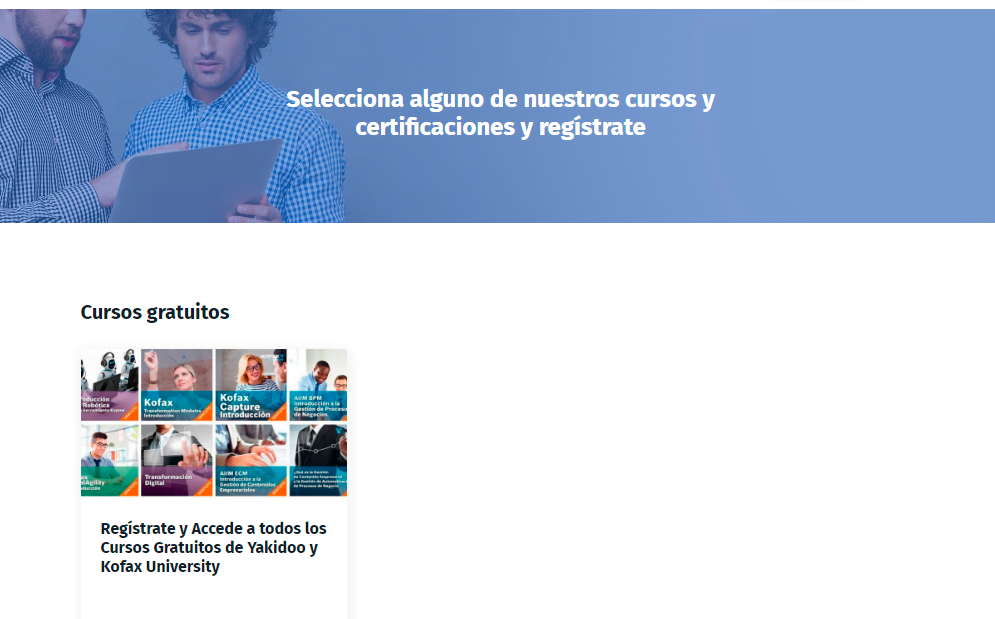
STEP #4: Complete the form on the right and click the button. “Register for Free”. If it is a certification, click to continue with the payment form.

Note: We recommend that you save your username and password so that you don't have to re-enter them when you log in.

STEP #5: You will receive an email with confirmation of your chosen course and a link to log in to Yakidoo University.

STEP #6: When you log in, you will see the section “My courses”, Click on the course and you will be able to start your training.

Ready to digitally transform your business?

Schedule a meeting with our experts today.

Related Articles